
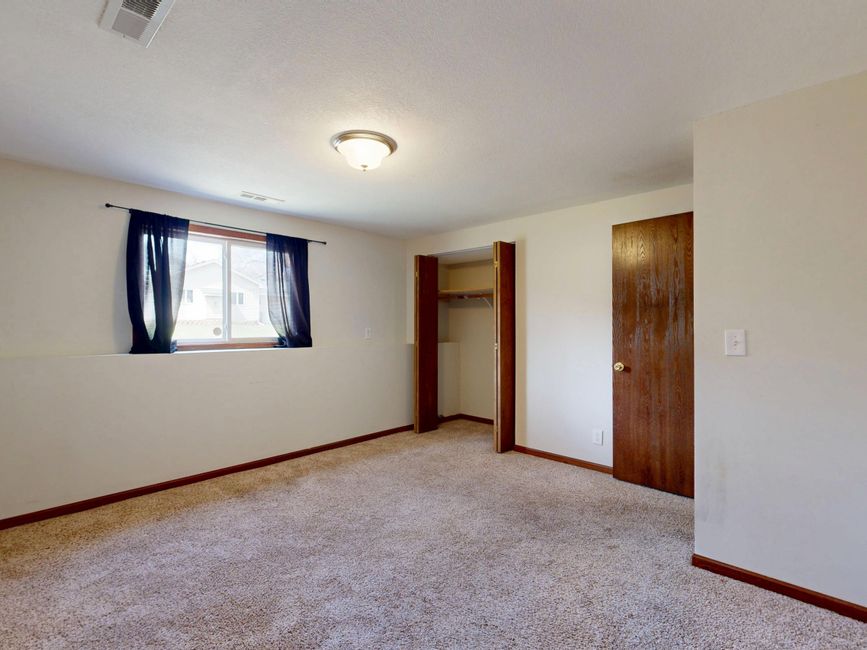
An empty bedroom can look smaller because buyers have fewer familiar objects to use as scale. Virtual furniture can supply those visual reference points, but it does not change the room’s dimensions and should never imply space the room does not have.
In 1946, American scientist Adelbert Ames Jr. demonstrated how strongly context can shape our judgment of size. His Ames room was built with distorted walls, floor, and ceiling, yet from a fixed viewpoint it appeared to be an ordinary rectangular room. People standing in different corners seemed dramatically different in size because the viewer interpreted them against a misleading frame.
The people had not changed. The frame had.
The Ames room illusion, documented by Encyclopaedia Britannica, concerns a deliberately distorted space, while a listing photograph should represent a real one accurately. Still, the underlying lesson applies: we estimate size through context. Remove familiar reference points, and the eye has more work to do.
Why empty rooms resist quick interpretation
A buyer scrolling through listing photos rarely studies a bedroom like a floor plan. They make a fast judgment: Does a bed fit? Is there room for two nightstands? Could I walk around the furniture without turning sideways?
An empty room provides walls, windows, doors, and floorboards, but those cues may not answer the practical question. Wide-angle photography can complicate the judgment further. So can an unusual ceiling line, a shallow alcove, or a doorway positioned near the camera.
This is why an unfurnished secondary bedroom can appear cramped even when its measurements are serviceable. There is no standard object translating square footage into daily use.
Furniture provides that translation. A bed establishes a recognizable footprint. A nightstand gives the wall beside it meaning. A rug helps the viewer read the usable floor area. None of those objects adds an inch to the room.
That distinction should guide the marketing copy too. “Shown with virtual furniture to illustrate one possible layout” is supportable when the image does exactly that. “Spacious bedroom” may be harder to defend because spaciousness is subjective and the staging itself may have influenced the impression.
Use virtual furniture as a scale reference
The most credible staging answers a narrow question: what might a plausible furniture arrangement look like inside the photographed boundaries?
Start with the original image and the known room dimensions. Choose furniture whose apparent scale matches those dimensions. Keep doors, windows, outlets, vents, trim, ceiling lines, and built-in elements where they belong. Avoid shrinking a bed, widening a wall, or concealing a tight passage so the composition looks cleaner.
The result should help a buyer interpret the room, not resolve every objection in the room’s favor.
That is where agent review matters. AI can place a queen-style bed in an image, but the image alone does not prove that a queen mattress, frame, nightstands, and comfortable circulation all fit as shown. Check the proposed layout against measurements before approving it. If the fit is uncertain, use fewer pieces or a less specific arrangement.
Apply the same discipline to the MLS description and narrated tour. A virtually staged bed should not quietly become evidence for copy such as “generous queen bedroom.” Furniture shown for visualization remains visualization. The final pre-launch consistency review can catch that shift before three assets repeat it as fact.
Preserve the buyer’s ability to verify
A useful staged image should sit beside a clear path back to reality. Retain the original photograph. Apply the required virtual-staging or AI-image disclosure for the relevant state and MLS. Preserve provenance showing what source image was used and what version was published.
California AB 723 and disclosure rules in roughly 38 other states make this more than a design preference. Requirements vary, and disclosure-assisted software does not replace an agent’s legal judgment or current guidance from a state association or MLS.
NestPath Listing Studio turns an agent’s own listing photos into a kit that includes virtually staged images with a burned-in, per-state AI disclosure, a public provenance page, a narrated Remotion tour, and an MLS-ready text pack with a fair-housing check. The agent still needs to review whether the furniture is plausible, whether the disclosure is appropriate for the destination, and whether the copy describes the property rather than the rendering.
Before export, use a concrete review sequence: compare staged and original images side by side, confirm architectural features are unchanged, check furniture scale against known measurements, and verify that the disclosure remains visible in the final file. The virtual staging export checklist covers the related handoff details.
Make the room easier to read without rewriting it
The Ames room worked because viewers trusted the apparent shape of the room and interpreted everything inside it accordingly. Listing photography carries the same responsibility in reverse: give viewers enough context to understand the space while preserving the actual structure they are evaluating.
For an empty bedroom, that may mean adding a restrained bed, two modest side tables, and nothing else. It may mean showing both the original and staged versions. It always means keeping the room’s boundaries intact and avoiding copy that converts a suggested arrangement into a property claim.
Virtual staging can answer, “How might this room be used?” Measurements, original photos, and an in-person visit answer, “How large is it?” Keep those jobs separate, and the staged image becomes a useful reference instead of a promise the room cannot keep.
Comments
No comments yet.