
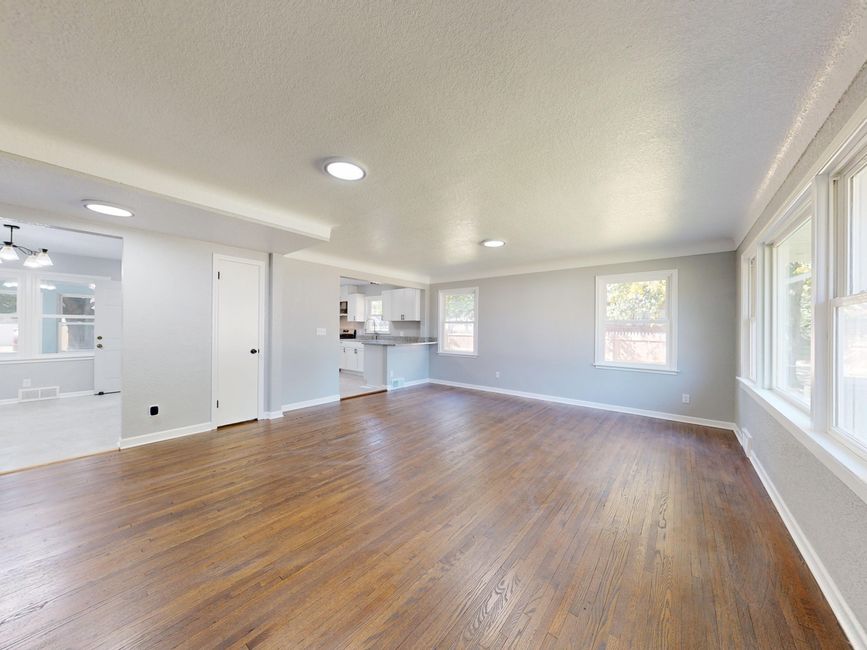
Before digitally furnishing a vacant room, apply one test: does the edited image help buyers understand the existing space, or does it give them a materially different home to desire? If the staging changes architecture, condition, scale, light, or permanent features, the image has crossed from explanation into misrepresentation.
At 8:12 on Monday morning, Lena, a fictional composite of a self-funded listing agent, was reviewing photos at her kitchen counter before an afternoon listing launch. The vacant living room looked cold, and the AI-staged version looked ready for a magazine: pale sofa, slim dining table, warm light, clean walls.
Then she noticed the window.
The staged image showed a wider opening with an uninterrupted view. In the original photo, part of that view was blocked by the wall. If Lena published the edit, a buyer could arrive expecting a brighter, more open room than the property offered. The launch deadline was approaching, but keeping the image could create a harder problem at the showing: a buyer asking where the advertised window had gone.
Run the test before evaluating the furniture
“Housefishing” is the listing-photo version of catfishing. The image attracts attention by presenting a home that the buyer will not encounter in person.
The easiest way to catch it is to ignore the furniture first. Compare the virtually staged image with the source photo and inspect the parts that convey the property itself:
- Do the walls, windows, doors, ceilings, floors, and built-ins match?
- Does the room appear wider, deeper, brighter, or better maintained?
- Have stains, cracks, cords, vents, or other visible conditions disappeared?
- Has the edit added a permanent fixture or implied a renovation?
- Could a reasonable buyer form a materially different expectation from this image?
Virtual furniture can help a buyer see that a narrow room might hold a sofa and a small table. It should not make the room appear wide enough for a sectional, dining set, and clear walkway when those items could not plausibly fit.
This distinction matters more than whether the image looks polished. A beautiful edit can still be a poor listing asset if it teaches the wrong lesson about the property.
Separate three different editing decisions
A practical Monday-morning review becomes easier when you sort changes into three categories.
The first category is furnishing. Sofas, beds, rugs, lamps, and removable decor can demonstrate a possible use for an empty room. Their scale and placement still matter. Furniture that blocks no doors, floats at a believable height, and fits the room’s proportions helps buyers interpret the photograph.
The second category is visual cleanup. This area requires caution because removing an accidental camera artifact differs from concealing property condition. A stray editing blemish may distract from the room. A removed wall crack, damaged floorboard, or exposed cable may change what the buyer believes they are considering.
The third category is alteration. Added windows, moved walls, changed flooring, replaced countertops, improved views, and invented built-ins depict a different property. Those changes should trigger a stop-and-review decision, not a more prominent disclosure badge.
A disclosure can tell the viewer that AI altered an image. It does not make every alteration appropriate. State requirements, MLS rules, brokerage policies, and the facts of the listing still require the agent’s judgment. NestPath assists with burned-in, per-state disclosure and a public provenance page, but it does not replace guidance from your broker, MLS, state association, or legal counsel.
Preserve the source and the path back to it
Lena removed the questionable version with the widened window. With little time left, she returned to the original and generated a restrained alternative that furnished the room without changing its boundaries.
The source image remained available for comparison. The staged version carried its disclosure, and its provenance page gave viewers a public route back to the original. That traceability matters because disclosure can disappear when an image is cropped or redistributed. The Disclosure Google’s Crop May Remove, and What Agents Risk Missing examines that failure point in more detail.
Before publishing, Lena placed the original and staged images side by side. The sofa helped explain the room. The window, wall position, flooring, and visible condition stayed the same.
That was the turn. She no longer had to decide whether the edit looked convincing. She had a narrower question with a defensible answer: did the buyer still see the same house?
Make buyer expectation the approval standard
Virtual staging often costs far less than the $2,000 to $8,000 agents may encounter for physical staging, and it can make an empty room easier to read online. The lower cost does not lower the agent’s responsibility for the finished image.
Use the likely showing conversation as your final check. If a buyer could stand in the room and reasonably say, “That feature was in the photo,” you need to be able to point to it. Furniture can vanish before a showing. Architecture, condition, and view should not.
When an edit seems questionable, compare it with the source at full size and ask what expectation it creates. If the problem involves a changed structural element, What Should You Do When AI Staging Changes a Wall? offers a focused review path.
By Monday afternoon, Lena’s listing used the quieter image. It had fewer dramatic touches, but the room a buyer saw online was the room waiting behind the front door.
Comments
No comments yet.